The Short Version
Forty-nine dollars gets hot-swap sockets, a metal knob, PBT keycaps, tri-mode wireless and a 4000mAh battery.
| Amazon rating | 4.4/5 |
| Best for | Somebody setting up a desk who wants mechanical switches, a knob and wireless without paying for a brand name. |
| Skip if | Anyone who needs a number pad, or who wants a keyboard from a brand with an established track record. |
How it was tested, and where the method is written down: How We Review.
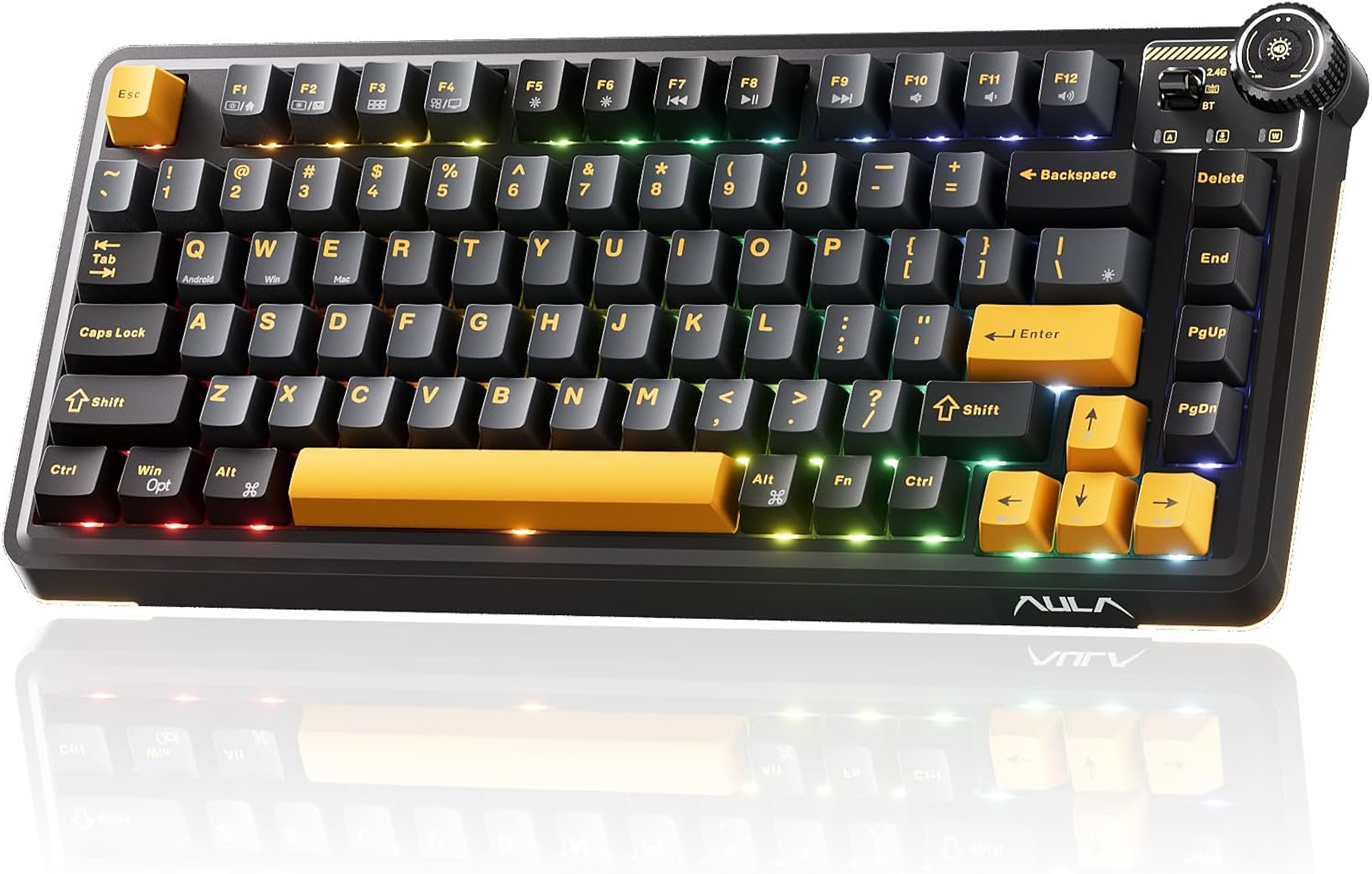
Forty-nine dollars for a 75 percent wireless mechanical keyboard with hot-swappable switches, a metal knob and RGB lighting is either a very good deal or a sign that something is soft. The OIXOC AU75 is the answer to that question, and the honest answer is that the soft part is the brand and the rating count, not the board. Twenty-six ratings is not a track record. Everything else on the spec sheet is a legitimate feature at a legitimate price.
The Spec
| Layout | 75 percent, QWERTY, 82 keys with a function row |
|---|---|
| Switches | hot-swappable, supports 3 and 5 pin, pre-lubed linear switches included |
| Keycaps | PBT, with pre-lubed stabilizers |
| Lighting | north-facing RGB, 16.8 million colors, adjustable by shortcut |
| Connection | Bluetooth 5.0, 2.4GHz wireless, USB-C wired |
| Battery | 4000mAh, rechargeable |
| Knob | adjustable metal knob, volume by default, remappable |
| Price | $49, rated 4.4 out of 5 across 26 ratings |
The Layout
Seventy-five percent is the compromise layout and it is the right one for most desks. You keep the function row, which full-size boards waste on keys you never press, and you drop the number pad, which is the single most common reason people buy a smaller board. A function row means F1 through F12 are where your hand expects them, and for anything with hotkeys or a media layer that is not a detail. It also means the board is wide enough for a nav cluster, which is what makes it useful for writing rather than just for gaming.
The Switches
Hot-swappable with 3 and 5 pin support, and it ships with pre-lubed linear switches and pre-lubed stabilizers. That is the part worth caring about: on a board this cheap, stabilizers are usually the first thing to rattle, and a pre-lubed stabilizer is a manufacturer admitting that it matters. Linears are smooth and quiet, and if you want tactility or a click you can pull them without a soldering iron. That makes the board a starting point rather than a fixed thing, which is the actual argument for hot-swap.
The Knob
There is an adjustable metal knob, which is unusual at this price, and it defaults to volume. It is the reason to pick this board over another cheap 75 percent. A knob is one key you can turn with a finger instead of hunting for, and on a wireless board where you are already reaching for the corner, that is a real shortcut. The listing says the knob can be remapped to other functions, which is what makes it more than a volume dial.
The Connection
Three ways in: Bluetooth 5.0, 2.4GHz wireless and USB-C wired, and the listing names PC, Mac, Xbox, PlayStation, tablet and laptop as compatible. Bluetooth is the mode that matters for a desk, because it is the one that lets you clear the cable clutter, and 5.0 is the current version. The 4000mAh battery is a large one for a keyboard and the recharge is over USB-C rather than a barrel plug, so one cable does the board and everything else on the desk.
Who It Is For
Somebody setting up a desk who wants mechanical switches, a knob and wireless at a price that does not need an apology. A programmer or writer who wants F-keys and a nav cluster in a compact layout. It is a good first mechanical keyboard and a good daily driver, and the PBT keycaps will not develop the shine that cheaper ABS caps get within a year. It is not for someone who needs a numpad, and it is not for someone who wants to be the early adopter of a brand with a track record.
The Verdict
Forty-nine dollars gets hot-swap sockets, a metal knob, PBT keycaps, pre-lubed stabilizers, tri-mode wireless and a 4000mAh battery. On features per dollar that is a strong board. The 4.4 out of 5 comes from twenty-six ratings, which is not much of a sample, and the brand is one nobody has heard of, so this is a bet on the parts rather than on the reputation. The keyboard itself looks like a board that costs twice as much, and at this price the thing to check first is the key feel, because that is the part a listing cannot promise.
Common Questions
Is the OIXOC AU75 hot-swappable without soldering?
Yes. It supports both 3-pin and 5-pin switches, so you can pull the included linear switches and drop in your own without a soldering iron. It comes with pre-lubed linear switches and pre-lubed stabilizers as standard.
What does the knob do?
It is an adjustable metal knob that controls volume out of the box, and it can be remapped to other functions. On a 75 percent board it is the fastest way to change volume without hunting for a key combination.
How does it connect to a computer?
Three ways: Bluetooth 5.0, 2.4GHz wireless and USB-C wired. The listing names PC, Mac, Xbox, PlayStation, tablet and laptop as compatible, and the 4000mAh battery recharges over USB-C.
Are the keycaps double-shot PBT?
They are PBT, which is the material that resists the shiny look after a year of use that cheaper ABS caps get. The stabilizers are pre-lubed, which is the detail that usually gets skipped on a board at this price.
Ready to buy a keyboard? Support the channel.